
Send a file that is too big to email.
Right-click it in Finder. Ricly uploads it and puts a link on your clipboard. Whoever you send it to downloads it without an account.
Free account, verified email · No card for Free · 296 MB
 Ricly▸Uploading Reel_v3.mov412 MB · 1 GB online at a timeLink copied!1/3 uploads today
You have done this a hundred times.
- Open a browser
- Type wetransfer.com
- Find the file again
- Drop it in
- Ask for a link
- Copy it
- Close the tab
Ricly puts that one in the menu that is already under your cursor. Right-click the file, pick Upload & Share, the link is already on your clipboard. This one does upload — it is the only tool that does.
See what else comes with itThis is the only tool that sends your file off your Mac.
Every other tool in Ricly works on-device. Sharing cannot, so here is exactly what happens instead of a promise.
That one file. Nothing else in the folder is read, listed or sent.
It sits there to be downloaded, and is used for nothing else.
The link dies on its own. There is no forever by accident.
Shared Links lists every live link. Revoke one and it stops working immediately.
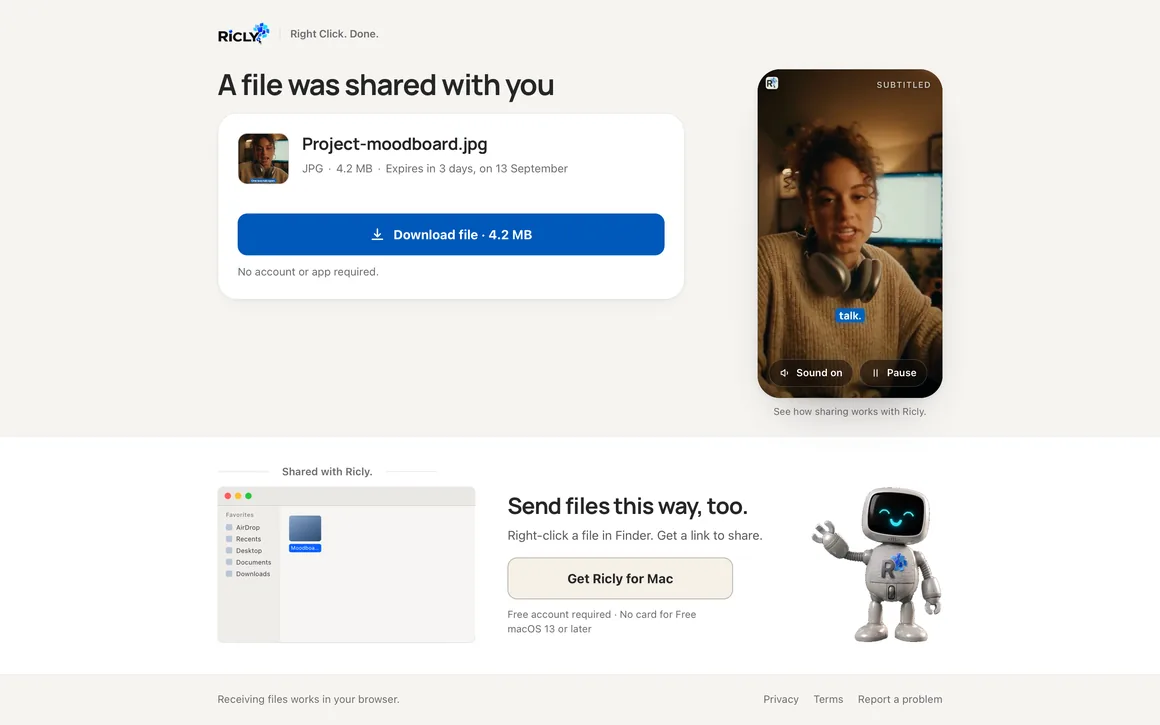
What the other person sees.
One page, one button. No account, no app, no email address to hand over, nothing to install. It works on a phone as well as on a desktop.
The page shows the file name, its type and size, and how long is left before the link expires — with a preview when it is an image. One button, and the file is theirs. Under it, a clip and a Finder illustration say where the link came from.
How it behaves.
The link is already on your clipboard
When the upload finishes, Ricly copies the link for you. Paste it into a message and you are done.
Any file, any size up to the ceiling
Video, audio, archives, folders you compressed first. There is no list of accepted types, only the storage ceiling of your plan.
The ceiling is what is online at once
Free keeps 1 GB live at a time. When a link expires, that space comes back and you can send again.
Every link is listed in the app
Shared Links shows what is live, how long is left and how many times each one was downloaded.
Same job. No round trip.
Everybody uploads for this one — that is what sending a large file means. The difference is how many moves it takes to get to the link.
With Riclyalready copied
WHAT IT REPLACES
A folder, not a fileyou selected
Ricly packs the selection into one archive before uploading. You do not compress anything yourself, and the person on the other end gets a single link instead of eleven. A drag-and-drop site can take several files too — what it cannot do is start from the folder that is already under your cursor.
macOS has its own answer, and it is a good one. Mail Drop sends up to 5 GB through iCloud, free, built into Mail, and the recipient downloads it for 30 days. If you are writing an email anyway, use it. What it cannot do is give you a link without an email — no message to compose, no address to type, nothing to send. Ricly puts the link on your clipboard so you can drop it in Slack, a message or a document. Finding the file counts as a step on a website, because you have to go and look for it in a picker. With Ricly you are already on it. Waiting is never counted: they all wait, and so does this one.

Stop sending files the old way.
No tab to open, no account to find, no window to drag a file into. The link is on your clipboard before you have let go of the mouse.
You came for one tool. 16 more come with it.
Upload & Share is not an app you install. It is one item in a menu that also carries 16 others — same download, same account, nothing extra to set up.
13 are free, 4 are Pro. They install themselves as they ship, so the menu grows without you doing anything. This one is the only tool in the list that sends anything off your Mac — the other sixteen never do.
Free sends real files.
1 GB online at a time, up to 3 new links a day, each expiring after 3 days.
- No file-type restriction and no watermark.
- The recipient never needs an account.
- Revoke any link at any moment.
- A free account is required, and the address has to be verified before your first link.
€47.88 billed yearly, or €4.99 month to month.
- Twenty times the storage, ten times the lifetime.
- Remove Background stops counting.
- The four Pro tools unlock: Extract Text, Upscale Image, Photo Grid, Batch Rename.
- 30 days free · 30-day trial for new subscribers · payment method required · cancel any time.
Questions people actually ask.
Does the other person need an account?
No. They open the link and press one button. They are never asked for an email address.
What happens when the link expires?
The page says the link has expired and offers nothing else. The file is gone and the space is back on your allowance.
Can I delete a link before it expires?
Yes. Shared Links in the app, revoke, and it stops working right away.
Is there a size limit per file?
The limit is what you keep online at once: 1 GB on Free, 20 GB on Pro. A single file can fill it. Free also caps you at 3 new links a day.
Is this the tool that uploads my files?
Yes, and it is the only one. Every other tool in Ricly runs on your Mac and works with the Wi-Fi off.
Why does my menu say “Upload & Share Lite”?
That is the free tier of this one tool: 1 GB online at a time, 3 new links a day, links lasting 3 days. The word comes off as soon as you are on Pro, and the ceilings with it — 20 GB and 30 days. Every other tool keeps the same name on both plans.
Can I send a folder?
Yes. Select a folder, or several files at once, and Ricly packs them into a single archive before uploading — you do not have to compress anything yourself. You get one link for the lot.
Before you send, you often want
Right Click. Done.
17 file tools in the Finder menu. Free to start.
Free account, no card · macOS 13 or later

Send the link to your Mac.
Ricly is a Mac app. Drop your email and we send the download link — nothing else.
We email you the download link, plus one reminder if you have not installed. Nothing else, and we delete your address after that. · Free · macOS 13 or later · 296 MB