
A MOV to MP4 converter for Mac, built into the right-click menu.
Your phone or your camera writes MOV, and the person on the other side wants MP4. Right-click it and the MP4 lands beside it, converted on your Mac. A 2 GB rush never goes near someone else's server.
Free account, no card · 299 MB · Apple silicon & Intel
 Ricly▸Convert to MP4Interview_raw.movConverted to MP4Interview_raw.mov
How to convert MOV to MP4 with Ricly
- Install Ricly and open it.Turn on the Finder extension when it asks (one setting), then create your free account and verify your email.
- In Finder, right-click the MOV or M4V.Select several to convert them together.
- Choose Ricly › Convert to MP4.The MP4 lands next to the original, with the same name.
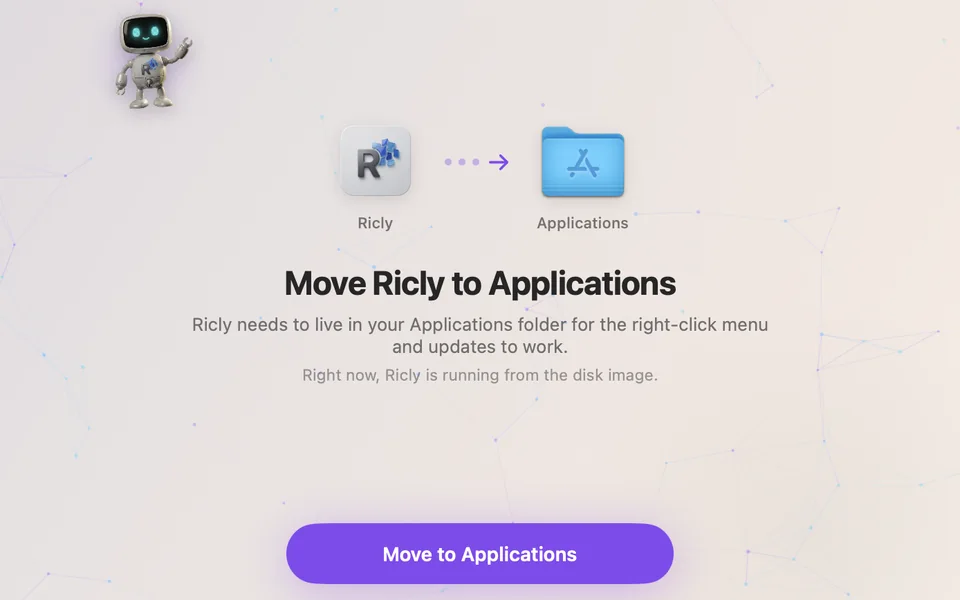
Move Ricly to ApplicationsOpened from the download? One click moves it.
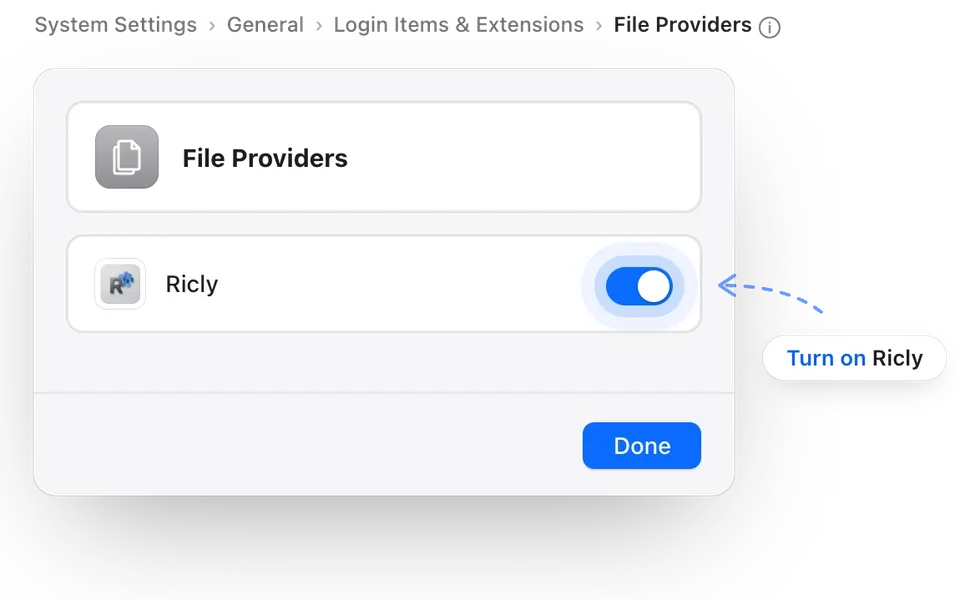
Turn on RiclyRicly opens the right pane in System Settings. On macOS 13 or 14, it’s a checkbox in Added Extensions.
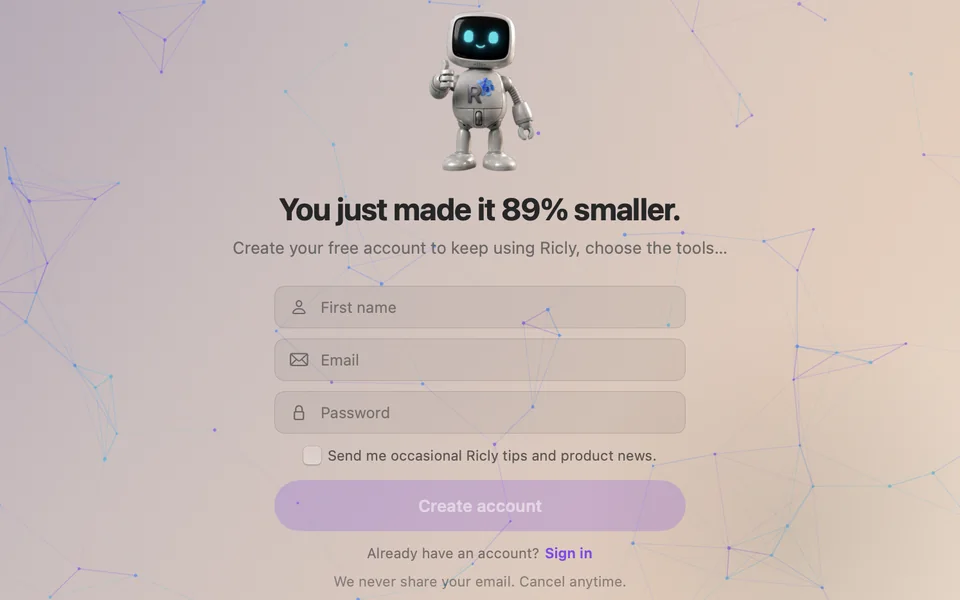
Create your free accountAfter a first try on a sample file. Then verify your email.
Convert MOV to MP4 without uploading
You have done this a hundred times.
- Open a browser
- Find a converter
- Upload the clip
- Wait for the upload
- Wait for the encode
- Download it
- Move it back
Ricly puts that one in the menu that is already under your cursor. Right-click the clip, pick Convert to MP4, the MP4 lands beside it. It uses AVFoundation, built into macOS, and a two-gigabyte rush never goes near an upload queue.
See what else comes with itCopied when it fits, re-encoded only when it must
One MP4 per file, made with AVFoundation, Apple’s video framework. Two files are converted at a time.
AVFoundation, built into macOS
Apple’s own video framework does the work. Nothing to install, no FFmpeg to find. It runs on Apple silicon and on Intel.
It copies the streams when it can
When the video is already H.264 or HEVC and the sound is AAC, Ricly changes the container without touching the streams: no re-encode, nothing lost. Otherwise it re-encodes only what MP4 cannot carry as is — the sound to AAC, the picture to H.264 — and keeps the rest.
The MP4 lands beside the original
Same folder, same name, new extension. Your MOV is not modified, moved or deleted, and a file that already carries the name is never overwritten — you get a numbered one instead.
A failed export leaves nothing behind
The export writes to a hidden temporary file and only swaps it in when it finishes. You never find a truncated MP4 that plays for four seconds and stops.
Ricly vs. QuickTime Player, HandBrake and online converters
Counted the same way, once your account exists, here is what each path costs.
With Riclyon your Mac
WHAT IT REPLACES
A whole selectiontwo at a time inside
A folder of rushes is one right-click. The menu reads Convert to MP4 (20 files), and Ricly converts two at a time.
macOS has its own export, in QuickTime Player. File › Export As, then a resolution. Apple says the result is a QuickTime movie (.mov), in H.264 or HEVC, and that QuickTime Player doesn’t export movies as MP4 videos. When the person on the other side asks for an MP4, Ricly makes one from the right-click menu, copying the streams when they already fit, and the file lands beside the original.

Send the cut, not the rush.
A MOV your client cannot open becomes an MP4 they can, without the clip ever leaving your Mac.
You came for one tool. 16 more come with it.
Video to MP4 is not an app you install. It is one item in a menu that also carries 16 others — same download, same account, nothing extra to set up.
13 are free, 4 are Pro. They install themselves as they ship, so the menu grows without you doing anything. Upload & Share is the next move when the MP4 is still too big for mail, and Strip Metadata is there for the stills that go with it.
A free MOV to MP4 converter, with no monthly limit
No monthly count on this tool. Convert a whole folder of rushes if you want to.
- This tool has no monthly count. Convert a whole folder of rushes if you want to.
- Select twenty clips, right-click once, twenty MP4s, two at a time.
- The same encoder and the same preset as any paid plan.
- A free account is required, with a verified email address.
€47.88 billed yearly, or €4.99 month to month.
- Pro adds nothing to this tool. It is already unlimited.
- The four Pro tools unlock: Extract Text, Upscale Image, Photo Grid, Batch Rename.
- Upload & Share goes to 20 GB and links last 30 days.
- 30-day trial for new subscribers · payment method required · cancel any time.
Converting MOV to MP4 on a Mac: common questions
Can QuickTime Player convert MOV to MP4?
Apple says QuickTime Player doesn’t export movies as MP4 videos: File › Export As gives a QuickTime movie (.mov) in H.264 or HEVC. Ricly makes the MP4 from the right-click menu.
How do I convert MOV to MP4 in the Terminal?
macOS includes avconvert. Run avconvert -s clip.mov -o clip.mp4 -p PresetHighestQuality in the Terminal: it re-encodes the video into an MP4. Ricly copies the streams instead when they already fit.
Is there a free MOV to MP4 converter for Mac?
Yes. Ricly’s Video to MP4 is free with no monthly limit, and avconvert is built into macOS for the Terminal.
What does the MP4 contain?
The same video and sound when they already fit MP4: H.264 or HEVC video, AAC sound. When they do not, what does not fit is re-encoded — the picture to H.264, the sound to AAC — and the orientation is kept.
Is it a re-encode?
Only when it has to be. If the video and the sound already fit MP4, Ricly changes the container without re-encoding anything, which is quick and loses nothing. Otherwise it re-encodes only the part that does not fit.
Which files can I use?
MOV and M4V. Anything else in the folder is simply not offered this tool in the menu.
Is the clip uploaded anywhere?
No. The export runs on your Mac, and a two-gigabyte rush never goes near a queue.
Where does the new file go?
Beside the original: same name, .mp4 extension. Your MOV is not modified, moved or deleted, and a name already taken gets a number rather than being overwritten.
Can I convert a whole folder at once?
Select the clips and right-click: the menu reads Convert to MP4 (20 files). Ricly converts two at a time.
Right Click. Done.
17 file tools in the Finder menu. Free to start.
Free account, no card · macOS 13 or later

Send the link to your Mac.
Ricly is a Mac app. Drop your email and we send you the download link.
We email you the download link, then one short check-in the next day. One click to unsubscribe. We delete your address after that. · Free · macOS 13 or later · 299 MB
Share the link to your Mac.
Sent! Check your inbox on your Mac.
Open the email there and Ricly installs in about two minutes.
Or just type usericly.com/mac on your Mac.
Want the founder deal?
€69 instead of €99
Ricly Pro for life · pay once
Every tool, including the 4 Pro ones
Only for the first 200 members
You're in. Your deal is on its way to your inbox.
One email with the deal, one reminder before it ends. We'll also email you big Ricly news, rarely. Unsubscribe anytime.
Get Ricly on your Mac
Ricly is a Mac app. We'll email you the download link, so you can install it when you're at your Mac.
We email you the download link, then one short check-in the next day. One click to unsubscribe. We delete your address after that.
Share the link to your Mac.
Ricly is a Mac app.
Send the download link to your Mac.
We email you the download link, then one short check-in the next day. One click to unsubscribe. We delete your address after that.
Share the link to your Mac.