
Combine two to six photos into one grid, from the right-click menu.
A before and after, three angles of the same product, a reference plate for an image model. Select the pictures, right-click, arrange them, and one file comes out. Composed on your Mac with nothing sent anywhere.
Free account, no card · 299 MB · Apple silicon & Intel
 Ricly▸Create Photo Grid4 filesDone!Front.jpg
How to combine photos into a grid with Ricly
- Install Ricly and open it.Turn on the Finder extension when it asks (one setting), create your free account, then switch to Pro and, in Ricly › Modules, click Enable on Photo Grid.
- In Finder, select two to six pictures and right-click.The menu reads Create Photo Grid… with the number of pictures.
- Choose Ricly › Create Photo Grid…, then set the frame.Layout, ratio, background and spacing are previewed, and the sheet lands beside the pictures.
Six pictures, one file, no design app.
- Open a browser
- Find a collage maker
- Upload the pictures
- Fight the template
- Export
- Download it
- Move it back
Ricly puts that one in the menu that is already under your cursor. Select two to six pictures, right-click, pick Create Photo Grid, set the frame, and the sheet lands beside them. Layout, ratio, background and spacing are previewed before anything is written, and nothing is uploaded.
See what else comes with it
One sheet, previewed before it is written
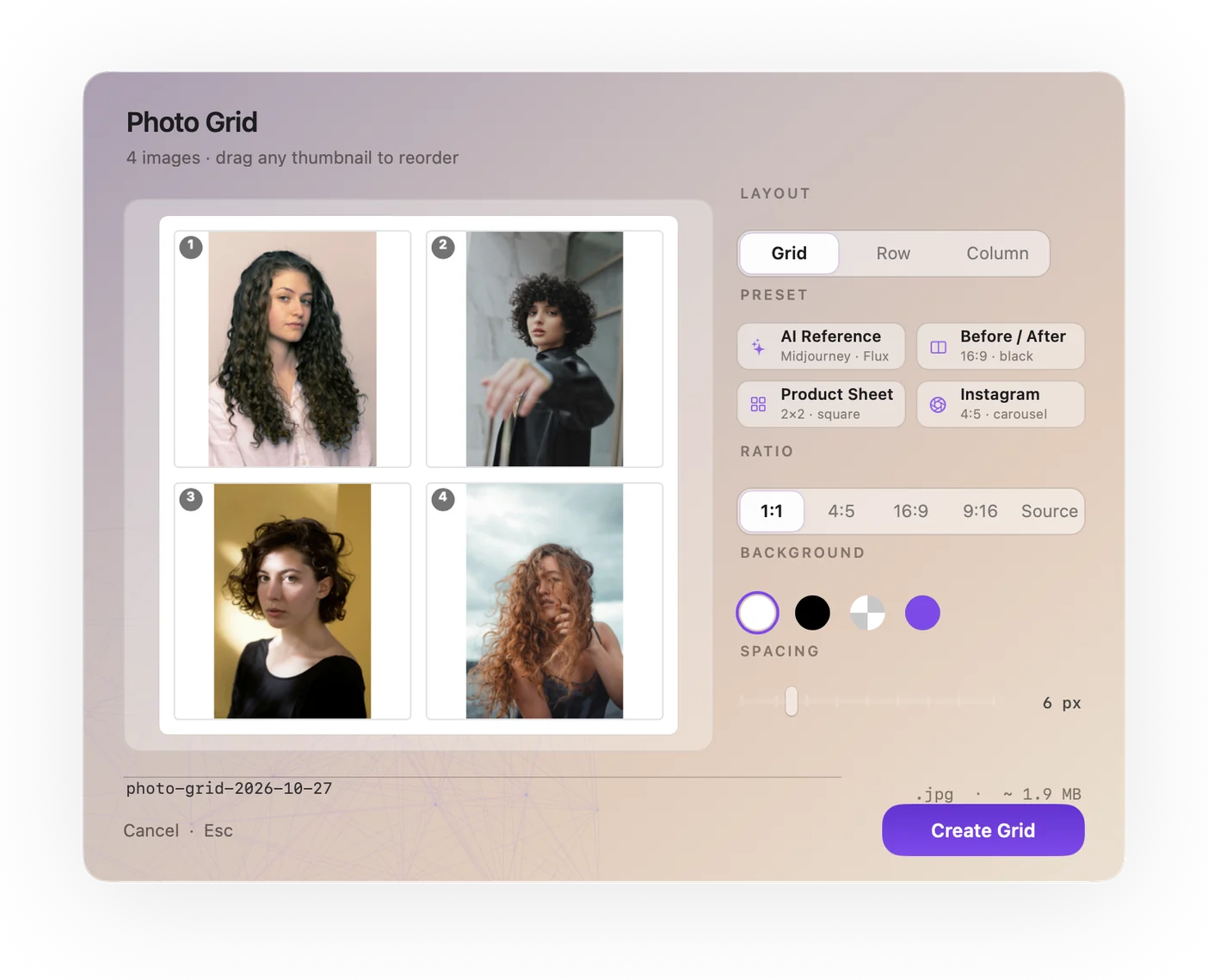
One sheet from two to six pictures, with the layout, the slot ratio, the background and the spacing set in a panel you see before anything is written.
The frame is yours to set
Square, 4:5, 16:9, 9:16, or let each slot keep the ratio of its picture. Background white, black, transparent or a color you pick. Spacing from zero to thirty-two pixels between slots.
You set the order by dragging
The panel lets you drag the pictures into the order you want rather than accepting an alphabetical sort that puts image_10 before image_2.
Made for reference plates
It was built around reference plates (front, profile and three-quarter in one file) for image models, and it works for a before and after or a product sheet just as well.
Composed with Core Graphics, locally
No service, no upload. The sheet is drawn by the same graphics engine the system uses, and it lands in the folder you were already in.
Ricly vs. Shortcuts, Canva and Keynote
Counted the same way, once your account exists, here is what each path costs.
With Riclyon your Mac
WHAT IT REPLACES
Six pictures, with Proone sheet,
six pictures
Six pictures is the ceiling, and it is a deliberate one. The menu reads Create Photo Grid… (6/6), the panel proposes a preset — AI reference, before / after, product sheet, Instagram — and you drag the pictures into the order you want. The sheet is named after the preset and the date, so it sorts itself a week later.
macOS has a way to do it: Shortcuts includes a Combine Images action, with an In a Grid mode, that you can build into a shortcut. Keynote and Pages hold several pictures on a page if you place them by hand and export. Ricly does it from the right-click menu, with a slot ratio, a background, spacing and an order you set in a preview, and names the sheet after the preset and the date.

Six pictures, one file.
Front, profile, three-quarter. A before and an after. Four products in a row. The sheet is made where the pictures already are.
You came for one tool. 16 more come with it.
Photo Grid is not an app you install. It is one item in a menu that also carries 16 others — same download, same account, nothing extra to set up.
13 are free, 4 are Pro. They install themselves as they ship, so the menu grows without you doing anything. Upscale Image is the pass to make before the sheet when the sources are small, and Strip Metadata the one to make after, before it goes out.
Photo Grid is a Pro tool, with no monthly limit
On Free, Photo Grid can’t be switched on, so it isn’t in your menu. If you turned it on during a Pro trial, it stays there marked ⚡, and a click opens the Pro page. 13 other tools are free for good.
- 13 tools work fully on Free, with no card.
- You can install Ricly and use it for months without paying.
- A free account is required, with a verified email address.
€47.88 billed yearly, or €4.99 month to month. No monthly count on this tool — make a sheet for every look if you want to.
- Photo Grid unlocks, with no monthly count.
- So do the other three Pro tools: Extract Text, Upscale Image and Batch Rename.
- Upload & Share goes to 20 GB and links last 30 days.
- 30-day trial for new subscribers · payment method required · cancel any time.
Combining photos on a Mac: common questions
How do I combine two photos side by side on a Mac?
Select both in the Finder, right-click and choose Ricly › Create Photo Grid…, then pick a row layout. Built in, Shortcuts includes a Combine Images action you can set up in a shortcut.
Can Shortcuts combine images into a grid?
Yes. Shortcuts on macOS 15.7 includes a Combine Images action with an In a Grid mode.
How many pictures can I put in?
Two to six. Fewer than two is not a grid, and more than six makes every slot too small to be useful — on a bigger selection the entry is grayed, with the reason in its title.
What can I set?
The layout; the slot ratio — square, 4:5, 16:9, 9:16, or each picture’s own; the background — white, black, transparent or a color you pick; and the spacing, from zero to 32 pixels. Everything is previewed before the file is written.
What are the presets?
AI reference, before / after, product sheet and Instagram carousel. Each one sets the layout, ratio, background and spacing at once; change anything and you are in custom mode.
Do I choose the order?
Yes, by dragging the pictures into place in the panel, rather than accepting an alphabetical sort that puts image_10 before image_2.
Where does the sheet go, and what is it called?
Beside the pictures, named after the preset and the date — ai-reference-2026-09-08.jpg — or after the name you type in the panel. A transparent background gives a PNG; everything else is a JPEG at quality 0.92. If the name exists you get -a, -b and so on.
Are my pictures uploaded anywhere?
No. The sheet is drawn with Core Graphics on your Mac, and the pictures never leave your disk.
Right Click. Done.
17 file tools in the Finder menu. Free to start.
Free account, no card · macOS 13 or later

Send the link to your Mac.
Ricly is a Mac app. Drop your email and we send you the download link.
We email you the download link, then one short check-in the next day. One click to unsubscribe. We delete your address after that. · Free · macOS 13 or later · 299 MB
Share the link to your Mac.
Sent! Check your inbox on your Mac.
Open the email there and Ricly installs in about two minutes.
Or just type usericly.com/mac on your Mac.
Want the founder deal?
€69 instead of €99
Ricly Pro for life · pay once
Every tool, including the 4 Pro ones
Only for the first 200 members
You're in. Your deal is on its way to your inbox.
One email with the deal, one reminder before it ends. We'll also email you big Ricly news, rarely. Unsubscribe anytime.
Get Ricly on your Mac
Ricly is a Mac app. We'll email you the download link, so you can install it when you're at your Mac.
We email you the download link, then one short check-in the next day. One click to unsubscribe. We delete your address after that.
Share the link to your Mac.
Ricly is a Mac app.
Send the download link to your Mac.
We email you the download link, then one short check-in the next day. One click to unsubscribe. We delete your address after that.
Share the link to your Mac.