
Short answer

- Shortcuts for files and folders (new file, copy path, open in Terminal) → iMenuX, QuickRight or RightClickMate.
- Converting many formats, documents included → convt or FileConverter.
- A few conversions without installing anything → the Finder’s own Quick Actions.
- Everyday file jobs in one menu: compress a PDF or a photo, turn HEIC into JPG, make an MP3 or an MP4, remove a background, share a big file → Ricly.
Finder right-click tools compared (as of October 2026)
| Tool | What it adds to the right-click menu | Price | macOS | Where files are processed |
|---|---|---|---|---|
| Ricly | 17 file tools: compress PDFs and images, convert HEIC, audio and video, resize, remove backgrounds, strip metadata, merge PDFs, find duplicates, share large files | Free account; Pro €4.99/month, or €3.99/month billed yearly | 13 or later | On your Mac. Only Upload & Share sends a file, to make a link |
| iMenuX | New files, open in an IDE or Terminal, copy path, cut and paste, copy or move, image conversion, compression, AirDrop, delete permanently | Free, with a $14.99 Lifetime Pro purchase | 14 or later | “Runs entirely locally,” says the maker |
| RightClickMate | New files, favorite folders, batch resize and rename, format conversion, hide private info in screenshots, annotate, password ZIP, Terminal, copy path | Free, with Pro purchases ($6.99, or $3.99 a year) | 14 or later | Not stated |
| QuickConvert | Converts images, video, audio, documents to PDF, archives and spreadsheets; text tools, OCR, background removal | Free, with a $5.99 Pro purchase | 13 or later | “Fast local processing,” says the maker |
| FileConverter | A “Convert to…” menu for documents, images, video, audio and spreadsheets, from a menu bar app | Free | 13 or later | “No network request is ever made,” says the maker |
| convt | “Convert with convt”: about 40 formats, whole folders, a command-line tool; also for Windows and Linux | $29 one-time (Desktop); Pro $12/month with cloud conversions | Not stated | Desktop: “Nothing gets uploaded,” says the maker; Pro adds optional cloud conversions |
| QuickRight | New files, Terminal or editor, copy path, cut and paste, favorite folders, ZIP, file hashes, image conversion and compression, folder icons | Free (optional tips) | 14 or later | Not stated |
| Finder Quick Actions (built in) | Rotate Left, Create PDF, Convert Image, Remove Background, Trim, Markup, plus your own Shortcuts | Included in macOS | Depends on the version | Not stated by Apple |
Prices and features as listed by each maker on October 23, 2026 (US App Store or the maker’s site). Ricly’s prices are shown in your currency, as on the pricing page.
What each tool does well
- iMenuX and QuickRight turn the right-click menu into a file manager’s toolbox: new files, copy path, open in Terminal or an editor. QuickRight gives all its features away for free.
- RightClickMate adds both file shortcuts and image work: batch resize, rename, and hiding private details in screenshots.
- convt converts about 40 formats. It converts whole folders, has a command-line tool and also runs on Windows and Linux. Its code is open source.
- FileConverter and QuickConvert convert documents, spreadsheets and archives, which Ricly doesn’t do.
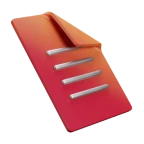
- Quick Actions are already on your Mac: select a file, right-click, choose Quick Actions.
Built into your Mac: Quick Actions
Right-click a file in the Finder and choose Quick Actions. Depending on the file and your version of macOS, you’ll see Rotate Left, Create PDF, Convert Image, Trim or Markup. Convert Image arrived with macOS Monterey. Remove Background is listed by default in macOS 27; in Sequoia and Tahoe, you add it under Quick Actions › Customize. You can also add your own actions with the Shortcuts app.
Out of the box, they don’t compress a PDF or make an MP3. For that, you need an app.
 The right-click way
What Ricly adds to your right-click menu
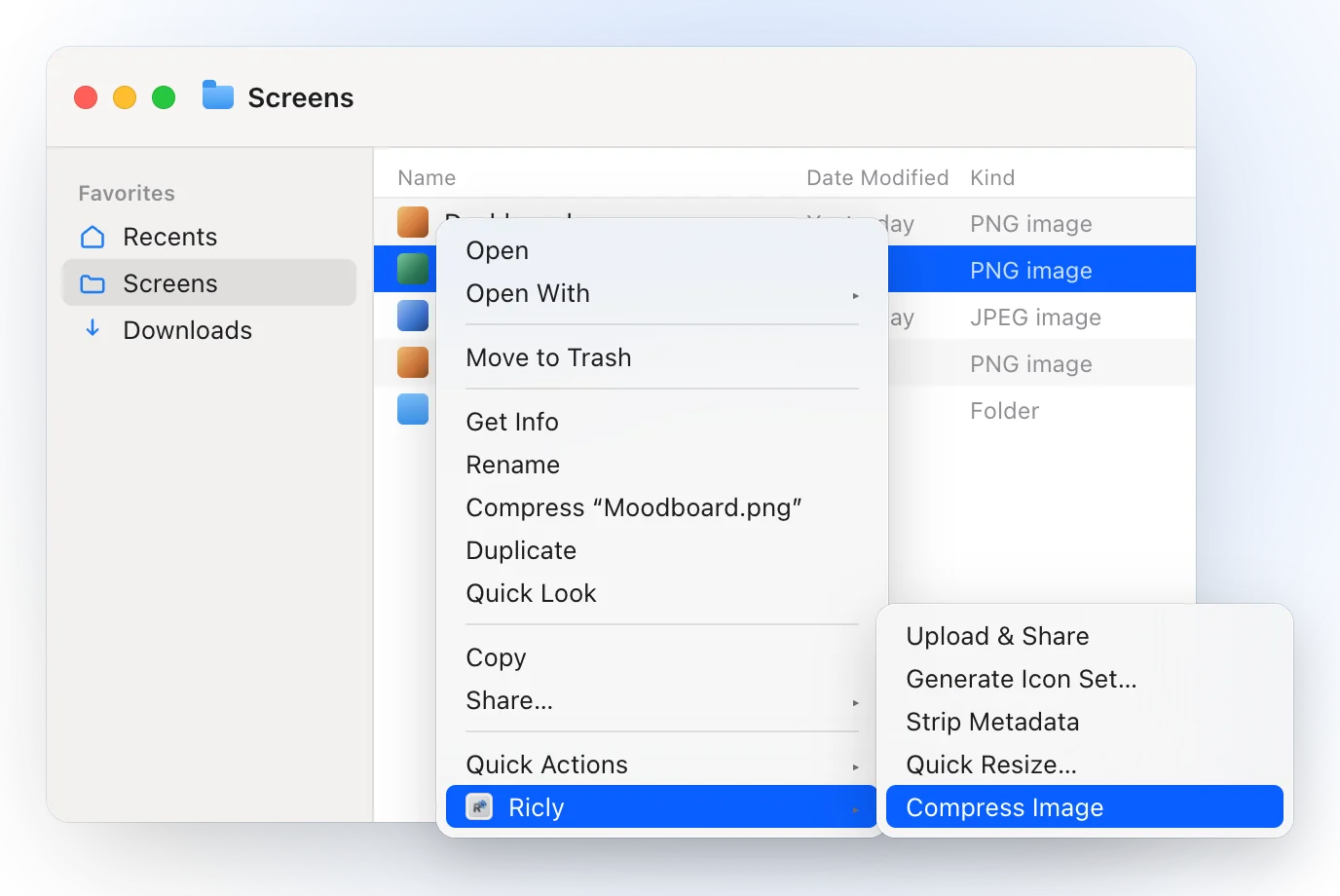
- Right-click files in the Finder and choose Ricly: the menu shows only the tools that fit what you selected.
- Select several files and Ricly works on all of them in one go.
- Converted and compressed files land next to the original, which stays as it is.
- Every tool runs on your Mac. Only Upload & Share sends a file, to give you a link.
- 17 tools in one menu: Compress PDF, Compress Image, HEIC to JPG, Image to WebP, Quick Resize, Remove Background, Strip Metadata, PDF Merge, Audio to MP3, Video to MP4, Find Duplicates, Generate Icon Set, Upload & Share, and with Pro, Batch Rename, Extract Text (OCR), Photo Grid and Upscale Image.
- macOS 13 or later, notarized by Apple. A free account to start.
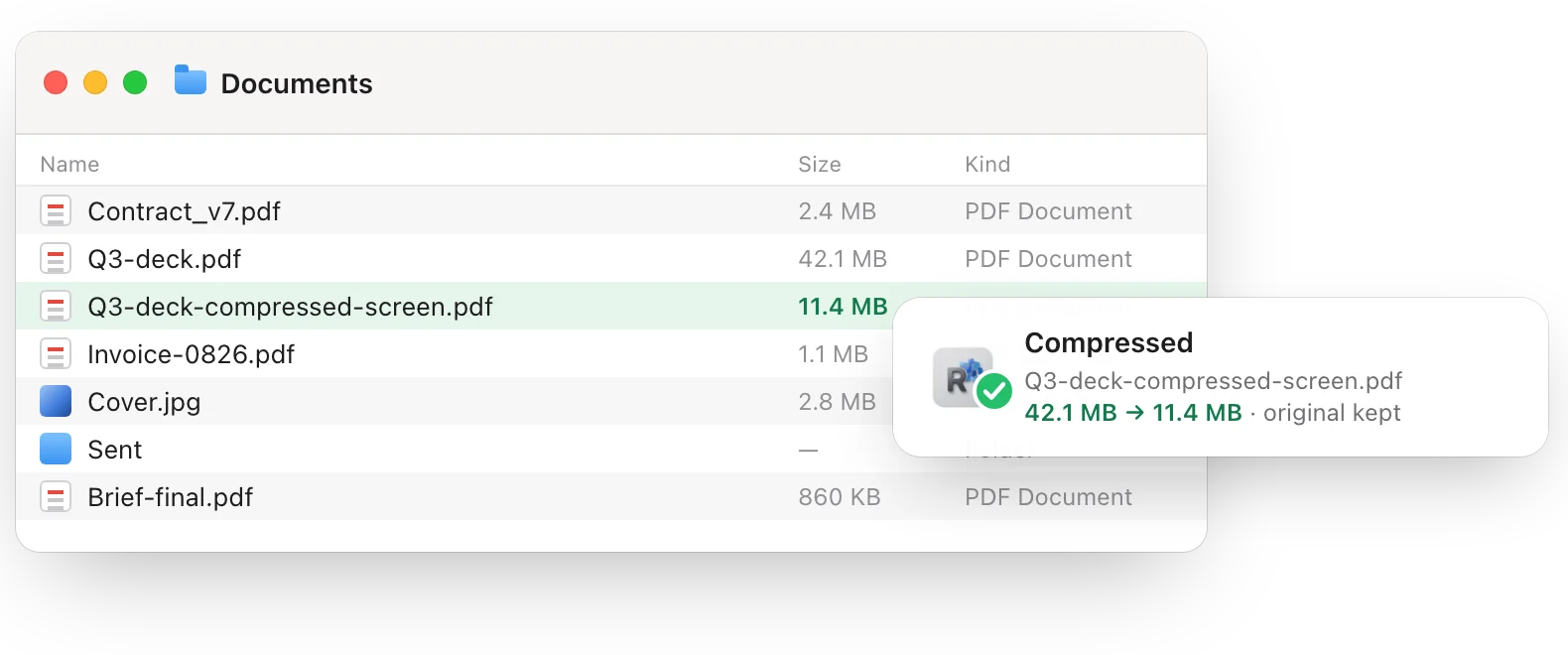
What Ricly doesn’t do: file shortcuts like New File or Copy Path, document or spreadsheet conversion, and Windows. For those, see the tools above.
How to pick
- You want shortcuts, not conversions → iMenuX, QuickRight or RightClickMate.
- You convert documents, spreadsheets or rare formats → convt, FileConverter or QuickConvert.
- You rotate or convert an image now and then → Quick Actions, already on your Mac.
- You compress, convert and share everyday files from one menu → Ricly.
Finder right-click tools: common questions
How do I add options to the right-click menu on a Mac?
Install an app that has a Finder extension, then turn the extension on in System Settings (Login Items & Extensions, or Privacy & Security › Extensions on older versions of macOS). Ricly asks for it once, when you first open it. For built-in options, right-click a file and choose Quick Actions › Customize.
Can I convert files from the right-click menu without an app?
A few, yes: Quick Actions can convert an image, create a PDF or trim a video. For PDFs, audio, video and batches of photos, you need an app like Ricly, convt or FileConverter.
Which right-click tools work without uploading my files?
Ricly works on your Mac; only Upload & Share sends a file, to make a link. iMenuX, QuickConvert, FileConverter and convt Desktop also say they process files locally.
Is there a free Finder right-click converter for Mac?
Yes. FileConverter is free, and QuickRight’s features are all free. Ricly is free to start, with a free account.
Does Ricly add New File or Copy Path?
No. Ricly works on the files you select: compress, convert, resize, clean up and share. For file shortcuts, iMenuX or QuickRight do that.
