

Short answer
Ricly compresses PNG and JPG files on your Mac, from the Finder right-click menu, at the same size in pixels, and keeps a copy only if it’s at least five percent lighter. It’s free with no monthly limit. TinyPNG’s free web tool takes up to 20 images at a time, 5 MB each, compresses them on its servers, and also handles WebP, AVIF and JPEG XL. If you need an API, a WordPress plugin or those formats, keep TinyPNG. And macOS can make an image lighter on its own, in Preview.
Who it’s for: Mac users who compress screenshots, product shots or images for a site, and would rather not upload them.
Why people look for a TinyPNG alternative
- Free limits. TinyPNG’s free web tool takes up to 20 images at a time, each up to 5 MB, and converts up to 3 images to another format. More capacity comes with its Web Pro and Web Ultra plans. Source: TinyPNG FAQ, “Can I compress my images for free?”
- Uploading images. TinyPNG compresses on its servers. It says only you can access what you upload, and it deletes the images after at most 48 hours. For client work or unreleased designs, some people would rather the files stayed on their Mac. Source: TinyPNG FAQ, “Is the privacy of my images ensured?”
- A Mac app. TinyPNG’s own tools are its website, an API, WordPress and Figma plugins and an image CDN. The Mac apps on its third-party page are made by other developers and work with its API. Source: TinyPNG third-party solutions
TinyPNG vs. Ricly (as of October 2026)
| TinyPNG |  Ricly Ricly | |
|---|---|---|
| Where it works | Any browser, plus an API, WordPress and Figma plugins and an image CDN | Mac only (macOS 13 or later) |
| Where your images are processed | On TinyPNG’s servers, kept for up to 48 hours | On your Mac |
| Free plan | Up to 20 images at a time, 5 MB each; format conversion for up to 3 images | No monthly limit |
| How it compresses | Smart lossy compression: fewer colors; a PNG can become an 8-bit indexed image | PNG: nothing lost up to 256 colors, otherwise no color channel moves by more than two levels; JPEG re-encoded only when it leaves room |
| Metadata | Removes unnecessary metadata | Keeps orientation, color profile, date and camera details |
| Formats | AVIF, JPEG XL, WebP, PNG, JPEG | PNG and JPG (WebP with Convert to WebP, HEIC with Convert to JPG) |
| Account | Not needed for the free web tool | A free account |
| Paid plan | See TinyPNG’s pricing page; the API has 500 free compressions a month | Compress Image is free. Pro: €4.99/month, or €47.88/year, for the Pro tools |
| Beyond compression | API, WordPress and Figma plugins, image CDN, website analyzer | 16 more file tools in the same menu: convert, resize, remove backgrounds, share |
| To start | Nothing to install | Install the app and create a free account |
Compress an image from your right-click menu, at the same size in pixels.
What TinyPNG does well, and when to keep it
TinyPNG compresses and converts AVIF, JPEG XL and WebP as well as PNG and JPEG. It has an API with 500 free compressions a month, official WordPress and Figma plugins and an image CDN, and its website works in any browser, with no account for the free tool. If you optimize images for a website automatically, keep it.
Built into your Mac
In Preview, choose File › Export to lower a JPEG’s quality, or Tools › Adjust Size to make an image smaller in pixels; Apple shows how to do several images at once. In the Finder, the Convert Image quick action changes the format or the size. They’re free and built in. Ricly is for when you want a PNG to stay a PNG, at the same size in pixels, from the right-click menu.
How to compress images on a Mac: 5 ways →
The right-click way
What Ricly does when you compress an image
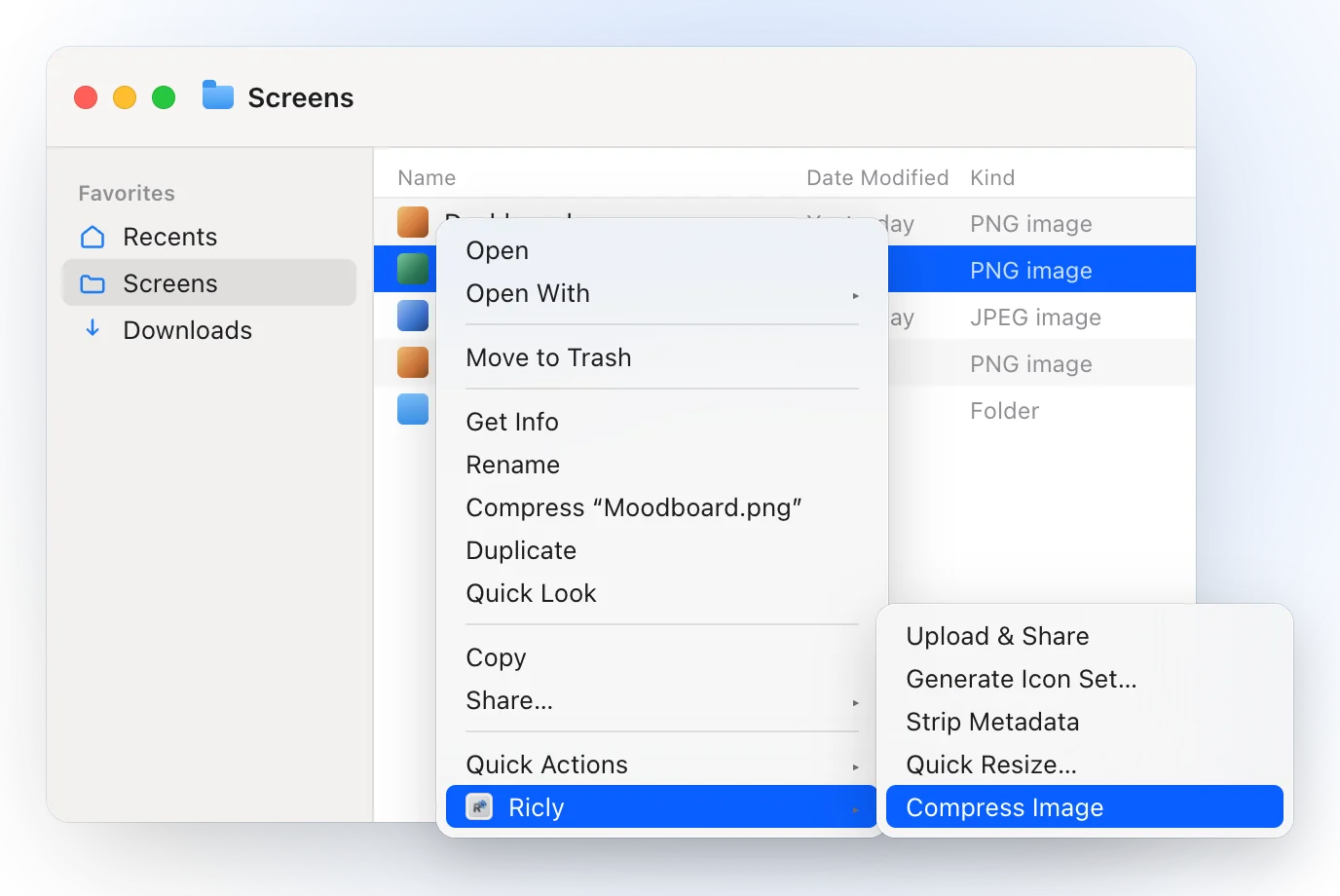
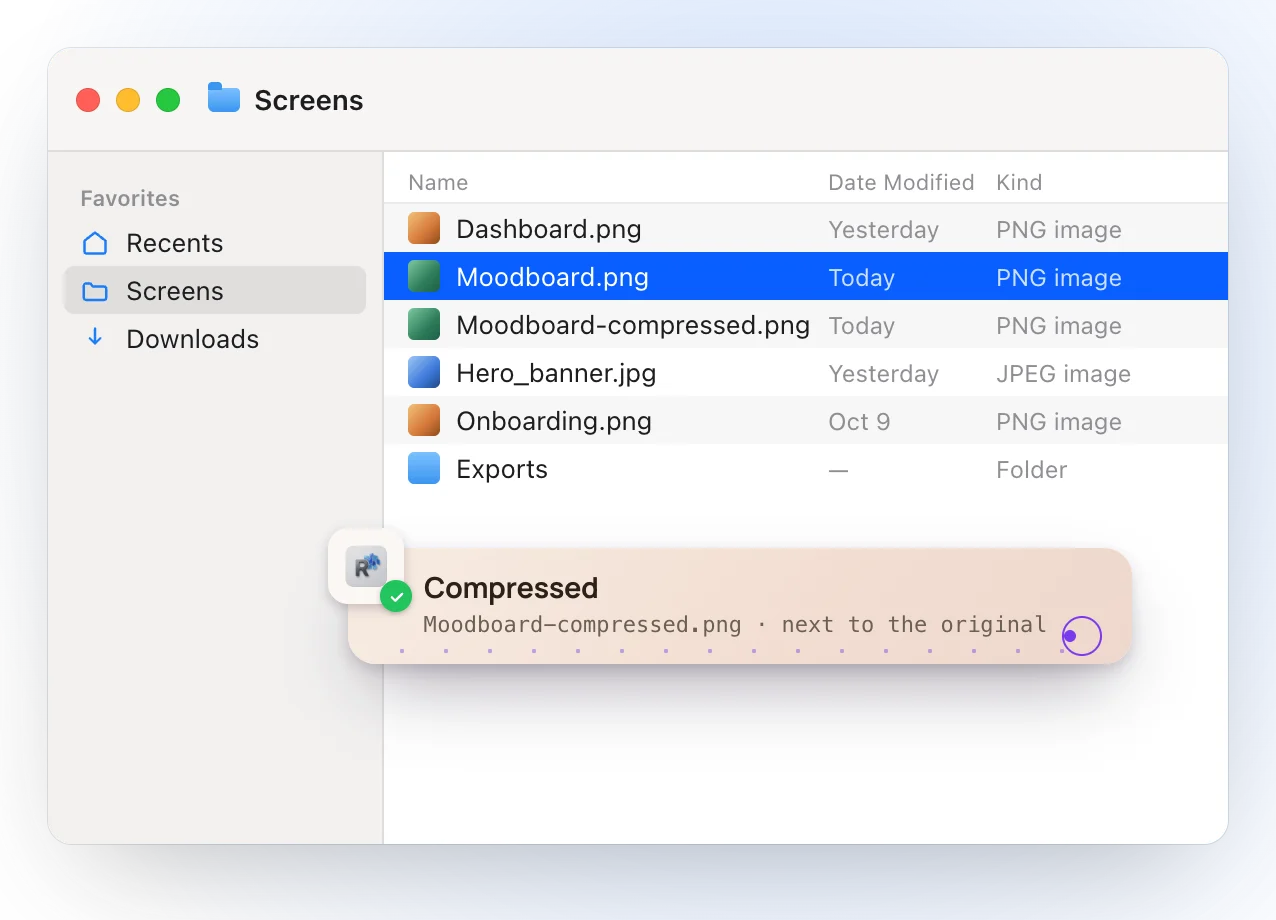
- Right-click PNGs or JPGs in Finder and choose Ricly › Compress Image: each lighter copy lands next to its original, with -compressed added to the name.
- Same size in pixels. A PNG with 256 colors or fewer comes out with nothing lost; otherwise no color channel moves by more than two levels out of 255, and only where the image is textured.
- A JPEG is re-encoded with mozjpeg only when the original leaves room for it.
- A copy is kept only if it’s at least five percent lighter. Otherwise nothing is written, and Ricly tells you so.
- Orientation, color profile, date and camera details come along, and the original is never modified.
- Both encoders, oxipng and mozjpeg, ship inside the app and run on your Mac, four images at a time, with no monthly limit.
Switch in 2 minutes
- Install Ricly and open it. Turn on the Finder extension when it asks (one setting), then create your free account and verify your email.
- In Finder, select the PNGs or JPGs and right-click: choose Ricly › Compress Image.
- The lighter copies land next to the originals.
After compressing
- Still too heavy for an upload form → Quick Resize (Under 2 MB, and more).
- Headed to a website → Image to WebP.
- A location in the photo → Strip Metadata.
- A HEIC from your iPhone → HEIC to JPG.
TinyPNG alternatives: common questions
Is TinyPNG free?
Yes, the web tool: up to 20 images at a time, each up to 5 MB, and format conversion for up to 3 images. Its Web Pro and Web Ultra plans add more, and its API has 500 free compressions a month (TinyPNG, October 2026).
Is TinyPNG safe?
TinyPNG says only you can access the images you upload, and it deletes them after at most 48 hours. With Ricly, images are compressed on your Mac.
Does TinyPNG have a Mac app?
TinyPNG’s own tools are its website, an API and WordPress and Figma plugins. Its third-party page lists Mac apps by other developers, such as TinyPNG4Mac, that work with its API.
Is there a free TinyPNG alternative that runs on a Mac?
Yes. Preview is built in. ImageOptim is a free, open-source Mac app you drop images into. Ricly compresses PNG and JPG from the right-click menu, free with no monthly limit.
Can Ricly convert to WebP or AVIF?
WebP, yes: Convert to WebP is free, in the same menu. AVIF and JPEG XL, no; for those, TinyPNG is the right tool.
Does Ricly have an API, or work on Windows?
No. Ricly is a Mac app.
Compress Image in Ricly →Compress images on a Mac →Other alternatives →
