

Short answer
If you mostly use iLovePDF to compress or merge PDFs on a Mac, Ricly does both from the Finder right-click menu, on your Mac, with no browser tab. It shows the exact size before you click, and its free plan covers 5 compressed PDFs and 5 merges a month. If you need iLovePDF’s long list of PDF tools, or Windows and Android, keep iLovePDF.
Who it’s for: Mac users who shrink or combine PDFs a few times a week and would rather not upload them.
Why people look for an iLovePDF alternative
- Uploading documents. iLovePDF’s web tools process your file on its servers, and iLovePDF says it deletes processed files within two hours. For a contract or a payslip, some people would rather the file never left their Mac. Source: iLovePDF security page
- Free limits and ads. On iLovePDF’s free web plan, Compress PDF takes up to 200 MB per task and 2 files at a time, with ads. Source: iLovePDF pricing page
- Their Mac app is paid. iLovePDF has a Mac app that works on your computer, but its tools come with Premium: $5.49 a month or $44.99 a year in the US Mac App Store, as of October 2026. Sources: iLovePDF desktop page, Mac App Store
iLovePDF vs. Ricly (as of October 2026)
| iLovePDF |  Ricly Ricly | |
|---|---|---|
| Where it works | Web, Windows, Mac, iOS, Android | Mac only (macOS 13 or later) |
| PDF tools | Dozens: edit, sign, OCR, Office conversions and more | Compress PDF, PDF Merge, Extract Text (Pro) |
| Other files | PDFs (images are a separate product, iLoveIMG) | 17 tools in one menu: images, audio, video, sharing |
| Where your file is processed | Web: on iLovePDF’s servers, deleted within two hours. Mac app: on your computer | On your Mac (Upload & Share is the one tool that uploads) |
| Free plan | Web: Compress up to 200 MB per task, 2 files at a time, with ads | 5 compressed PDFs and 5 merges a month on your Mac, no ads |
| Paid plan | Web: see iLovePDF’s pricing page. Mac app: $5.49/month or $44.99/year (US Mac App Store) | Pro: €4.99/month, or €47.88/year |
| To start | Web: nothing to install | Install the app and create a free account |
Compress a PDF from your right-click menu, and see the exact size before you click.
What iLovePDF does well, and when to keep it
iLovePDF covers far more PDF work than Ricly: editing text, signing, Office conversions, OCR, page tools. It runs in any browser, on Windows and on phones, and its Mac app handles files on your computer if you pay for Premium. If that’s what you need, keep it.
The right-click way
What Ricly does with a PDF
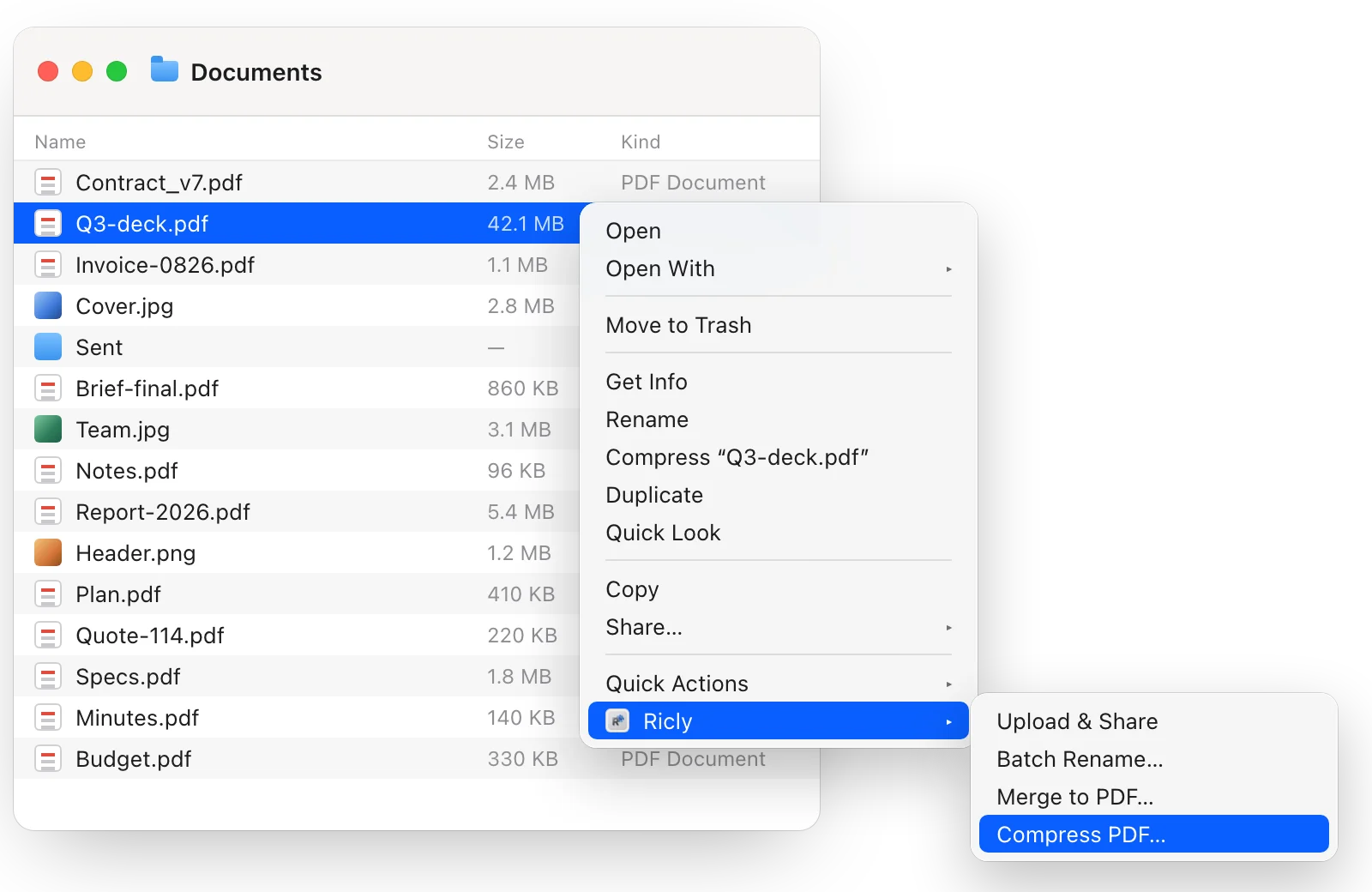
- The size Ricly shows before you click is the size you get, to the byte.
- If Ricly can’t make it smaller, it tells you and keeps your original. It never hands you a bigger file.
- Two settings, Screen and Print, plus other sizes it has already measured on your file.
- Your originals are never touched.
- Everything happens on your Mac. Nothing is uploaded.
- Merge to PDF combines PDFs and images (JPG, PNG, HEIC, WebP, TIFF) into one PDF. Before it merges, it shows them as thumbnails: press Return to keep the order, or drag one to change it.
How to compress a PDF on a Mac: Preview, Shortcuts and Ricly, with the sizes we measured →
Switch in 2 minutes
- Install Ricly and open it. Turn on the Finder extension when it asks (one setting), then create your free account and verify your email.
- In Finder, right-click a PDF and choose Ricly › Compress PDF… (or select several files and choose Merge to PDF…, after clicking Enable on PDF Merge in Ricly › Modules).
- Pick Screen or Print. The lighter copy lands next to the original.
Other iLovePDF jobs Ricly covers
- Merge PDF → PDF Merge: select the files, right-click, Merge to PDF… Free, 5 a month.
- JPG to PDF → right-click one image and choose Convert to PDF (free, no monthly limit), or select several and choose Merge to PDF…
- OCR, PDF to text → Extract Text, with Pro.
- Compress images (iLoveIMG) → Compress Image, free.
iLovePDF alternatives: common questions
Is iLovePDF safe?
iLovePDF says it uses HTTPS, encrypts files in transit and at rest, and deletes processed files within two hours. Whether that’s enough for a confidential document is your call. With Ricly, Compress PDF works on your Mac and nothing is uploaded.
Is there an offline alternative to iLovePDF?
iLovePDF’s own Mac app works on your computer, with Premium. Ricly also processes PDFs on your Mac, with a free plan; it needs an Internet connection to sign in, and to reconnect every few days.
Does iLovePDF have a Mac app?
Yes. It’s in the Mac App Store and needs macOS 12 or later.
Is there a free iLovePDF alternative on a Mac?
Preview, built into macOS, can reduce a PDF’s size: see our guide to compressing a PDF on a Mac. Ricly’s free plan compresses 5 PDFs and merges 5 times a month.
Can Ricly edit or sign PDFs?
No. It compresses, merges and, with Pro, extracts text. For editing and signing, iLovePDF or Preview are the right tools.
Does Ricly work on Windows?
No. Ricly is a Mac app.
Compress PDF in Ricly →PDF Merge in Ricly →Other alternatives →
