
Short answer
For photos in your library, Photos has its own: click Duplicates under Utilities in the sidebar, select the copies, then click Merge. For files in folders, Ricly finds exact copies from a right-click on the folder, and the Terminal can do it with a command built on shasum.
Rather right-click a folder and review the groups? See how Ricly does it ↓
Running out of space? See what’s taking it, and what deleting actually frees →
Three ways at a glance
| Method | Where | What it looks at | What counts as a duplicate | Price |
|---|---|---|---|---|
| Photos | Utilities › Duplicates | Your photo library | Apple doesn’t say | Built in |
| Terminal | A command with shasum | The folder you run it in | Same SHA-256 fingerprint | Built in |
 Ricly Ricly | Right-click a folder | That folder and every folder inside it | Same SHA-256 fingerprint, byte for byte | Scan free; 10 files to the Trash a month free |
Find duplicate photos with Photos (built in)
- Open Photos and click Duplicates under Utilities in the sidebar.
- Select the copies you want to combine (⌘A selects them all).
- Click Merge and confirm.
What it does. Photos keeps one copy and moves the others to Recently Deleted, where Apple says you can recover them for 30 days. Apple also notes that, depending on the size of your library, duplicates may take some time to appear as Photos analyzes your photos.
Good to know. It works on the photos and videos in your Photos library. Apple’s page doesn’t say whether it matches exact copies or similar pictures.
Find duplicate files in the Terminal
macOS includes shasum, which computes a SHA-256 fingerprint for each file: two files with the same fingerprint are the same file. In the folder you want to check, run:
find . -type f ! -empty -exec shasum -a 256 {} + | sort | awk 'seen[$1]++'
It lists every copy after the first one in each group, with its path, and leaves empty files out. Hidden files are included; Ricly skips them. We tried it on macOS 15.7. Deleting is up to you, one file at a time, so check each path before you do.
The right-click way
Find duplicate files with Ricly
- Install Ricly and open it. Turn on the Finder extension when it asks (one setting), then create your free account and verify your email. In Ricly › Modules, click Enable on Find Duplicates (it’s off at first).
- In Finder, right-click a folder and choose Ricly › Find Duplicates….
- Review the groups, then move the copies to the Trash.
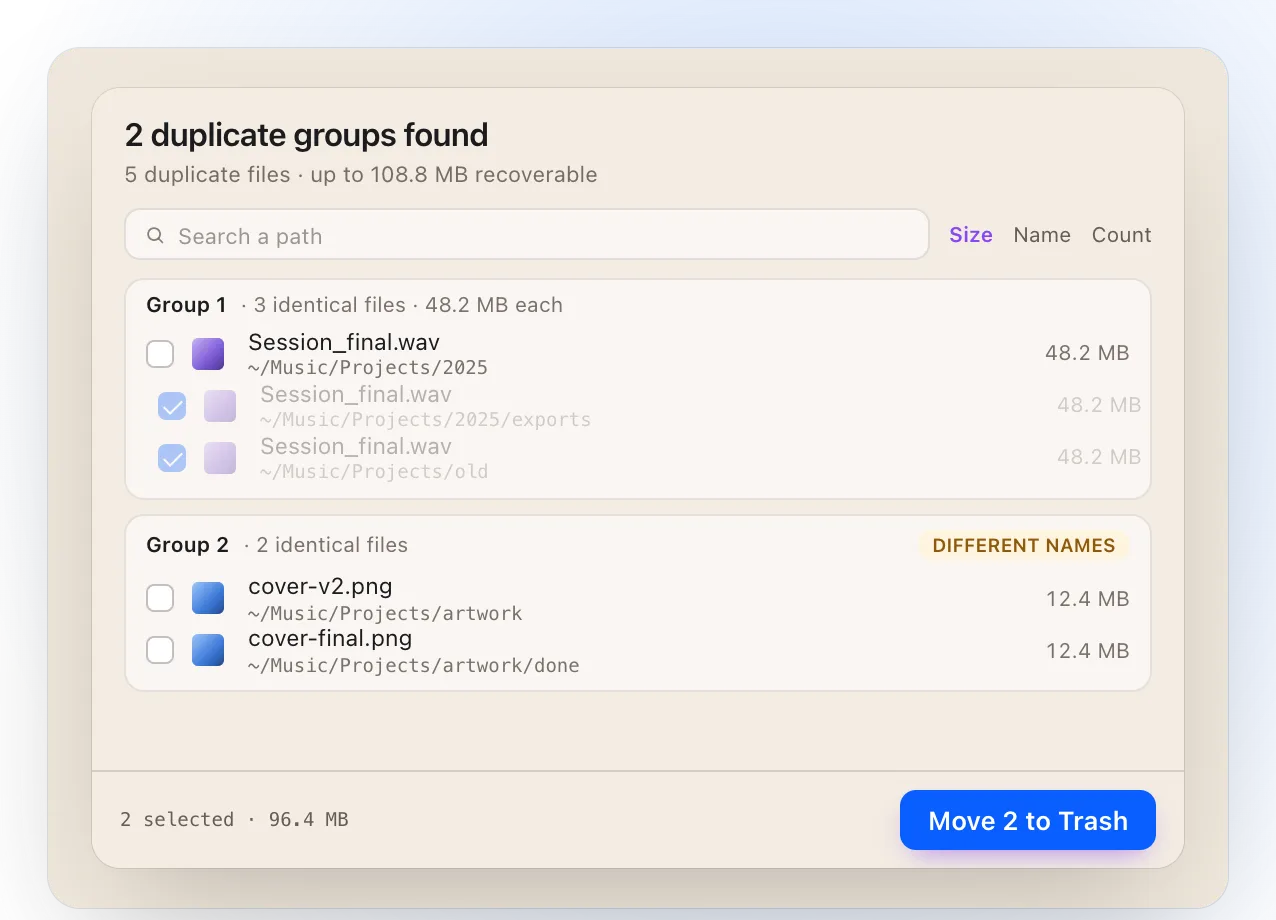
- It looks inside every folder in the one you right-clicked, on your Mac or on an external drive.
- It compares content with SHA-256: a renamed copy is caught, and two photos that only look alike are not. No near-matches means nothing to second-guess.
- It skips hidden files, empty files and the inside of app bundles and photo libraries, and leaves symbolic links alone.
- You choose which copy to keep: the newest, the oldest, or the one in its original location. When the copies carry different names, nothing is checked for you.
- Everything goes to the Trash, so you can put it back from there; nothing is deleted outright.
- Everything happens on your Mac. Nothing is uploaded.
Where it falls short. It finds exact copies only, not similar photos. The free plan moves 10 files a month to the Trash (the scan itself is never limited). Disk images (.dmg) are left out. It needs macOS 13 or later.
Delete duplicate files safely
Whatever you use, keep one copy you trust, and move the rest to the Trash rather than deleting them outright: you can still put a file back. Photos keeps removed copies in Recently Deleted for 30 days; Ricly sends copies to the Trash. Empty the Trash yourself once you’re sure.
Which one should you use?
Finding duplicate files on a Mac: common questions
Does macOS have a duplicate file finder?
For photos, yes: Photos gathers duplicates from your library under Utilities › Duplicates. For files in folders, you can sort a Finder window by Size or Name and compare likely copies yourself, or use the Terminal command above.
How do I find duplicate files on a Mac for free?
Photos and the Terminal are built in. Ricly’s scan is free and never limited; the free plan moves 10 files a month to the Trash.
Can I find duplicates on an external drive?
With Ricly, yes: right-click a folder on the drive. Disk images (.dmg) are left out.
Will it find similar photos, not just exact copies?
Ricly finds exact copies only, byte for byte. Apple doesn’t say how Photos decides.
How do I find duplicate music files?
Right-click your music folder with Ricly: copies are grouped even when they were renamed. Two different encodes of the same song are different files, so they aren’t grouped.
Is it safe to delete duplicates?
Move them to the Trash rather than deleting them, keep one copy you trust, and empty the Trash once you’re sure.
Does Ricly upload my files?
No. The scan and the comparison run on your Mac, and nothing is uploaded.
Find Duplicates in Ricly →Compress Image →Send it as a link →
